

We are constantly seeking ways to make our lives easier and more secure. Home security is a top priority for many, and Eufy has come up with a nifty solution – the Eufy Security Video Smart Lock S330. In this article, we will take a closer look at this innovative product and see how it can enhance the security of your home.
Simple Installation and Setup
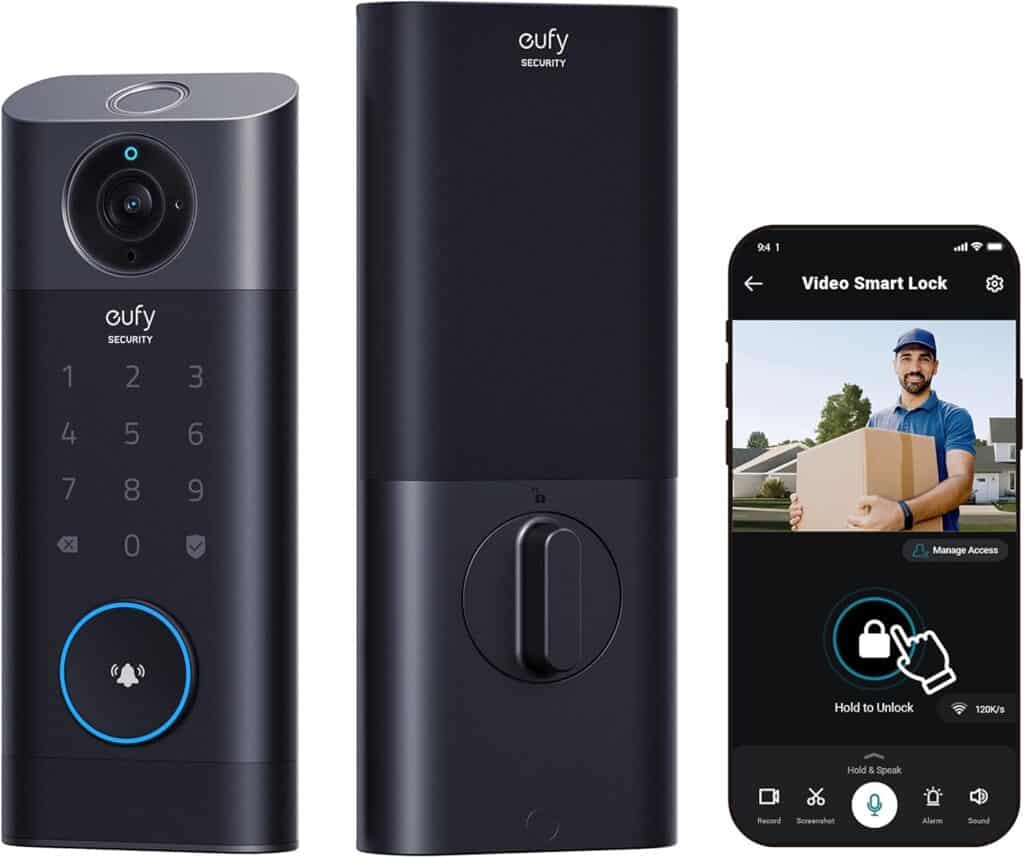
One of the standout features of the Eufy Security Video Smart Lock S330 is its easy installation process. You don’t need to be a tech guru to set it up. The package comes with everything you need, including clear instructions. Most users find they can get it up and running in no time.
Keyless Entry with Added Security
Say goodbye to fumbling for your keys or worrying about losing them. With this smart lock, you can unlock your door using a PIN code, a fingerprint, or even your smartphone. This keyless entry system not only adds convenience to your daily life but also provides an extra layer of security.
Built-in Video Camera
Another cool feature of the Eufy S330 is its built-in video camera. This camera records every interaction at your door, providing you with a visual record of who comes and goes. You can access these recordings through the Eufy app, giving you peace of mind when you’re away from home.
Real-Time Alerts
The Eufy Smart Lock doesn’t just record video; it also sends you real-time alerts when someone approaches your door. This feature is especially handy if you’re waiting for a package delivery or want to keep an eye on who’s visiting while you’re not at home.
Battery Life
No one wants a smart lock that constantly needs recharging. The Eufy S330 boasts an impressive battery life that can last for several months on a single charge. You won’t have to worry about running out of juice when you need it most.
Weatherproof Design
The Eufy Security Video Smart Lock S330 is designed to withstand the elements. Whether it’s scorching hot or freezing cold outside, this smart lock will continue to operate reliably, ensuring that you’re never locked out due to weather-related issues.
Affordable Security
In a market filled with expensive smart home security systems, the Eufy S330 offers a budget-friendly alternative. You get all the essential features without breaking the bank.
Eufy Security Video Smart Lock S330 – Key Benefits
Convenience and security are two things we all need. Eufy Security Video Smart Lock S330 brings these two essentials together simply and efficiently. Let’s explore the key benefits of this smart lock.
Eufy Security Video Smart Lock S330 offers a range of benefits that make it a valuable addition to any home. It combines convenience with security, making your daily life easier and safer. With its straightforward installation, real-time alerts, and user-friendly features, this smart lock is a practical choice for anyone looking to upgrade their home security. Say goodbye to fumbling for keys and hello to a more secure and convenient way of protecting your home.
Eufy Security Video Smart Lock S330 – Installation Guide
The Eufy Security Video Smart Lock S330 is a user-friendly and effective way to enhance the security of your home. In this guide, we’ll walk you through the installation process step by step, making it easy for you to set up your new smart lock.
What’s in the Box:
Before we get started, let’s check that you have everything you need:
Installation Steps:
Step 1: Remove Your Old Lock
Start by removing your existing deadbolt lock from the door. Unscrew and detach both the interior and exterior parts of the old lock.
Step 2: Prepare the Door
Ensure that the door is clean and free from any debris or old screws. You want a smooth surface for the new smart lock to be installed correctly.
Step 3: Install the Interior Mounting Plate
Take the interior mounting plate and attach it to the interior side of the door using the provided screws. Make sure it’s aligned properly and secure.
Step 4: Insert Deadbolt Assembly
Slide the deadbolt assembly into the hole on the edge of the door. Ensure that the tapered end is facing the direction where the door closes. Secure it in place with the screws provided.
Step 5: Install Exterior Mounting Plate
Attach the exterior mounting plate to the outside of the door using the screws. Align it carefully so that it lines up with the deadbolt assembly on the inside.
Step 6: Insert Batteries
Open the battery cover on the interior side of the lock. Insert the provided AA batteries and close the cover.
Step 7: Connect the Interior and Exterior Units
Place the interior unit onto the interior mounting plate, aligning the holes. Attach it securely by tightening the screws provided.
Step 8: Attach Strike Plate
Finally, attach the strike plate on the door frame using the screws. Ensure that it lines up perfectly with the deadbolt for a secure fit.
Programming Your Smart Lock:
Your Eufy Security Video Smart Lock S330 comes with a user manual that provides detailed instructions on how to program and use the lock, including setting up access codes and connecting it to your smartphone if desired.
Testing the Lock:
Before relying on your new smart lock, test it a few times to make sure it works smoothly. Lock and unlock it using both the keys and the keypad to ensure everything is functioning correctly.
Congratulations! You’ve successfully installed your Eufy Security Video Smart Lock S330. Now you can enjoy the convenience and peace of mind that comes with enhanced home security.
Remember, if you ever encounter any issues or have questions about your smart lock, refer to the user manual or contact Eufy’s customer support for assistance. Enjoy the added security and convenience your new smart lock brings to your home!
Final Thoughts
Eufy Security Video Smart Lock S330 is a user-friendly, affordable, and reliable addition to your home security setup. With its keyless entry, built-in video camera, real-time alerts, and long-lasting battery, it provides peace of mind without the need for complex installations or costly subscriptions. If you’re looking to enhance the security of your home without hassle, the Eufy S330 is worth considering.


Leave a Reply